
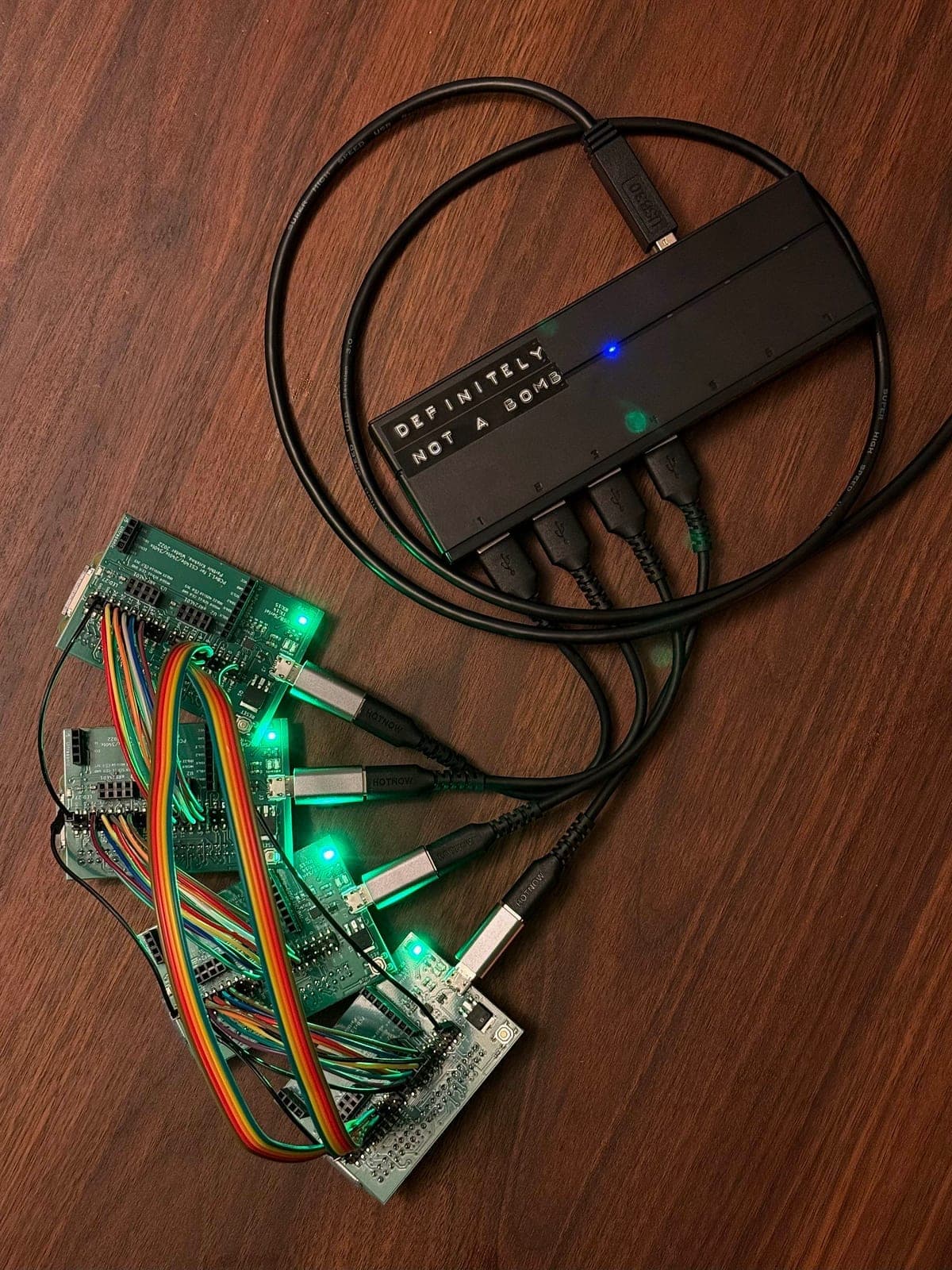
I spent the last few weeks building  PiTorch , a framework for running LLM inference and training on a cluster of four Raspberry Pi Zeros. It's named after PyTorch (but for the Pi!).
I'm by no means the first person to get an LLM running on a Pi, so what makes PiTorch different?
-
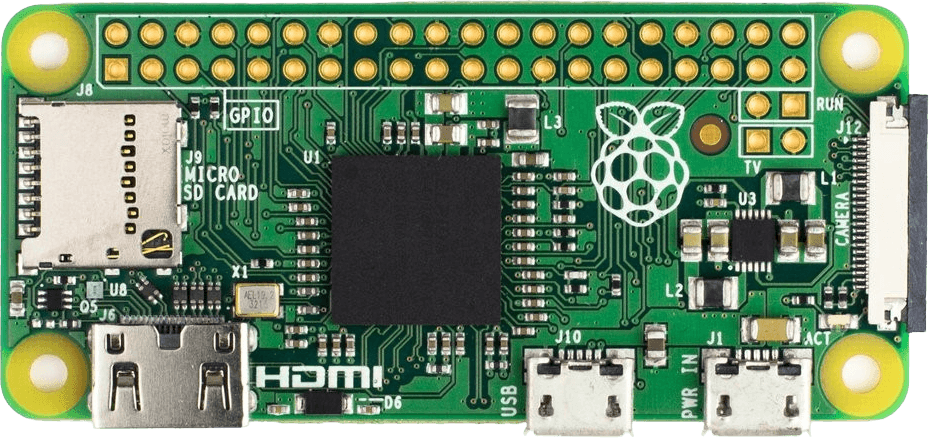
I use a Pi Zero, the weakest thing you could buy that still qualifies as a computer [2]: CPU architecture from 2002, 512 MB of RAM shared with the GPU. ML on Pis is usually on the Pi 4 or 5 [3]; the Zero is ~100x weaker, with a GPU we program in assembly (and whose docs have quite a few painful errors [4]).
-
It's fully baremetal, which means it's literally just our code and the hardware (no operating system): to print a character we write a byte to address
0x20215040, to get two Pis to talk to each other means sending one bit at a time over a wire (which is also how our program gets onto the Pi in the first place!).
So it's all really cursed. The best error message we get (if we get any) is r/pi not responding, and the bug could be anywhere: a register read one cycle too early, our program corrupting itself because the stack landed inside the model weights, or in the literal code that loads our code. (Or the bug only shows up 20% of the time).
This post is a condensed retelling of the journey. Along the way: how GPU parallelism works at the hardware level, thinking about memory regions, and how to battle the aforementioned bugs.
I wrote this for people like myself who have no prior experience in embedded systems, just a joy for tinkering. Enjoy :)
1. Setting the stage
So: we have a Pi, an SD card in it, and a cable connecting it to our laptop. Before anything LLM-related, I'll briefly (A) illustrate how code runs end-to-end with "Hello, World!" and (B) go over the memory regions for that program.
1A. Hello, World!
On a laptop:
- We write
printf("Hello, World!")in C, compile, and run.printfalready exists as part of the language's standard library, and the operating system takes care of the rest. printfformats our string and asks the OS to display it. The OS passes the characters to a device driver, which knows how to talk to the relevant hardware. Several layers of software handle this, each one doing something we didn't have to think about.
On a baremetal Pi, we write the same C, but those layers of abstraction don't exist; the compiled binary contains our code and nothing else. Click through the steps below:
The Pi and our laptop communicate using UART: they agree on a speed, and send one byte at a time over a single wire. The bootloader (pre-loaded program on the SD card) receives our binary and puts it into RAM at
0x8000.These steps underlie much of the rest of this post: talking to the GPU is writing to a different set of addresses, loading model weights is loading a different file into a different region of RAM, and connecting four Pis is UART on steroids [5].
1B. The playing field: 512 MB
Everything on the Pi lives in one flat 512 MB of RAM, and we are (unfortunately) free to write anything to any address (including even overwriting the program itself).
Below is the memory map of our Hello World program's layout. Notice:
- Our program lives in RAM at
0x8000, loaded there by the bootloader. - The stack at
0x18000000(384 MB) is our program's scratchpad: local variables, function calls, return addresses. - The GPU gets the top 32 MB reserved for itself. The amount is configurable, and we'll use this space in Section 3A .
Pi Memory Layout
~2 MB used
~21 KB binary at 0x8000
local variables, function calls
GPU reserved
2. Pi's first words
Now we can run programs on the Pi, how shall we run an LLM? Three steps: (A) loading the model into RAM, (B) running the forward pass (which requires writing our own math), and (C) converting the output tokens to English . Code snippets are linked throughout.
2A. Loading the model
The model we'll use for development is a 15M-parameter LLaMA 2 model trained on children's stories [6], called  stories15M .
The 58 MB weight file would take over an hour to transfer over the cable every time we ran a program. Instead, we can place it on the SD card and have the GPU firmware load it into RAM. The same way it places the bootloader (kernel.img) into RAM at 0x8000 in Section 1, it can also load our weights directly before the CPU even wakes up. One line in config.txt :
initramfs weights/stories15M_full.bin 0x2000000By the time our code starts, the weights are just there at 0x2000000 ready for us to read and use.
The file stories15M_full.bin is actually two things concatenated: model weights and tokenizer data [7]. The weight format is self-describing : a 28-byte header encodes dimensions, layer count, and vocabulary size, enough to compute exactly where the weights end and the tokenizer begins.
Here's the memory map with the model loaded. The 15M model fits comfortably at 20%, but toggle to 42M or 110M and we'll see the address space fill up fast:
Pi Memory Layout (with LLM)
94 / 480 MB CPU (20%)
~21 KB binary at 0x8000
6 layers + embeddings + tokenizer
KV cache + attention scratch
main + interrupt stacks
GPU shader workspace
Weights, KV cache, stacks, and GPU arena all fit comfortably. Most of the address space is free.
2B. Running the model
A transformer forward pass is really just a bunch of math, which is already covered in many incredible resources [8]. The important point for us is just that these operations need math functions that the Pi literally cannot do (no hardware unit for e.g., exp, sqrt, sin, cos [9]). So I implement our own math library (~100 lines) that approximates each function using only the arithmetic the hardware does support (using some tricks [10] that exploit how floats are stored in memory). I test each one on the Pi and compare with NumPy reference values from my laptop.
With the math in place, we can run the full forward pass : feed the model an input, and it spits out a number representing its best guess for the next token. Do that repeatedly and we get our first sequence:
step 0: token=1 → next=9038     (17.8s)
step 1: token=9038 → next=2501  (17.2s)
step 2: token=2501 → next=263   (17.3s)
step 3: token=263 → next=931    (17.4s)
step 4: token=931 → next=29892  (17.2s)
And it matches the PyTorch reference (computed on on Mac first ) exactly, so the LLM is correctly running! Onto the final step.
2C. Output tokens → English words
A tokenizer converts between numbers and word-fragments (e.g., 9038 = "Once"). We adapt ours from Karpathy's llama2.c , but two pieces need reimplementing from scratch since we have no standard library:
- For encoding (text → token IDs), we sort the vocabulary ourselves with a slower algorithm that's small enough to write from scratch. The 32K vocab needs to be sorted so each lookup is a fast binary search. The standard library does this with
qsort; without it,pt_text.c uses a tiny in-place shellsort instead [11]. - For decoding (token ID → text), we hand-write a tiny parser for the one byte-token pattern we need. Decoding is mostly a vocabulary lookup, except the LLaMA tokenizer also stores raw bytes as little tokens like
<0x0A>(here, a newline). The standard library would parse the hex withsscanf("%x", ...), a general-purpose format parser; withoutsscanf, we just match the literal<0x..>shape and convert the two hex characters by subtraction.
With the tokenizer plugged in, we finally get:
> Once upon a time
…Once upon a time, there was a little girl named Lily. She loved to play outside in the sunshine. One day, Lily found a big...
Look, the Pi talks! Unfortunately, it takes 17.4 seconds per token, so "Hello, World!" would take about 87 seconds [12]. Time for the fun part: scaling it up!
3. Scaling up
Great, now we have a working LLM running on the Pi, albeit terribly slowly. In the real world, scaling ML infrastructure happens along two primary dimensions:
- Making it faster. Getting the same hardware to do more work per second: writing tight low-level programs (kernels) tailored to the chip, and using all of its compute units in parallel instead of one at a time.
- Making it bigger. One Pi's 512 MB isn't enough for the bigger models, so we bring in more Pis to share the work. But how do you share the work without making it harder than it was on a single device?
I also implement training along the way, where we go from 6 minutes → 13.7s per step, but since the techniques overlap heavily with inference, the details live in Appendix B: Training on the Pi .
3A. Making it fast
The GPU
The forward pass is dominated by matrix-vector multiplies [13]: y = Wx, repeated 43 times per token. On our single CPU core, each matvec runs sequentially: the classifier layer alone (32,000 × 288) is 18.4 million multiply-adds.
Thankfully (and surprisingly?), the Pi Zero has a GPU on the same chip, called the VideoCore IV: 12 cores called QPUs (the Pi's version of a GPU core), each operating on 16 values simultaneously [14], giving us 192 parallel lanes:
CPU
1 core, 1 at a time
GPU
12 QPUs × 16 lanes
The big question, on any GPU, is how the compute lanes get their data. On an NVIDIA GPU, the GPU has its own dedicated high-bandwidth memory (HBM), physically separate from the CPU's RAM, so data has to be explicitly copied over before any GPU kernel runs [15].
The Pi Zero's GPU shares the same physical RAM as the CPU, so you'd think there's no problem. But the compute lanes can't just read from any address whenever they want (there's no general-purpose load instruction). Instead, there are three dedicated hardware paths, each with different rules, that are available to us.
The GPU is best thought of as a factory [16]: the compute lanes are workers and the hardware paths are the only loading docks (materials in, products out). The bottleneck is almost never the workers themselves, it's idle workers waiting for materials to arrive. When that happens it's called a stall: the lanes have nothing to compute on this cycle because the data hasn't been delivered yet, so they sit doing nothing.
As such, the design of the kernel is really the design of the data flow. Which path delivers what, when, and in what order, so the workers stay busy and never stall.
Click through the three paths below:
GPU Memory Paths
Uniforms (broadcast x)
The simplest way to send data to the GPU. The CPU pre-fills a FIFO buffer before launching the kernel. One instruction pops the next value and broadcasts it to all 16 lanes simultaneously. We use this for the input vector x: every lane needs the same x[k] value, so one read serves all 16.
mov r3, unif # read x[k], broadcast to all 16 lanesUniforms (broadcast x)
The simplest way to send data to the GPU. The CPU pre-fills a FIFO buffer before launching the kernel. One instruction pops the next value and broadcasts it to all 16 lanes simultaneously. We use this for the input vector x: every lane needs the same x[k] value, so one read serves all 16.
mov r3, unif # read x[k], broadcast to all 16 lanesTMU — Texture Memory Unit (gather W)
Originally designed for sampling textures in graphics (looking up pixel colors from a 2D image), but we repurpose it as the fast path for reading from RAM. Each QPU has its own TMU, so all 12 read in parallel. Reads are pipelined: we issue the next fetch while waiting for the current one, hiding the ~9-cycle latency almost entirely.
Each of the 16 lanes can submit a different address, which is how we fetch 16 different rows of W at once:
mov r0, elem_num         # r0 = lane index (0..15)
mul24 r0, r0, ra3        # × row length → each lane points to a different row
mov tmu0_s, ra10         # submit 16 addresses; result arrives ~9 cycles later
ldtmu0                   # collect the result into r4
VPM — Vertex Pipe Memory (write y)
The GPU's only write path back to main memory. A 4 KB on-chip scratchpad shared across all 12 QPUs. Each QPU writes its 16 dot products into its own VPM row, then a DMA transfer flushes everything back to SDRAM in bulk.
mov vpm, ra20    # write 16 dot products into VPM
mov vw_addr, rb1 # trigger DMA back to main memoryy = Wx: Uniforms to broadcast x to all lanes, TMU to fetch 16 different rows of W in parallel, and VPM to write results back to main memory.My first attempt was to use VPM for both reading W and writing y, as the VPM is the obvious "shared memory" of the QPU. However, that 4 KB scratchpad is shared across all 12 QPUs and requires a mutex lock to kick off a transfer, so when one core is loading data, the other 11 stall. The TMU is the better fit for reads: each QPU gets its own independent fetch path with a free L1 cache, and all 12 cores actually run in parallel. Pete Warden discovered and wrote about this tradeoff in detail.
Each kernel is a short assembly program: set up the three memory paths, run a tight inner loop of fmul/fadd, DMA the results back. The full set of PiTorch kernels (matvec, GEMM, transpose) all follow this same shape, and my C wrappers expose them with a PyTorch-like API.
If you want to go deeper on the QPU programming model, Stanford's CS240LX GPU lab is incredible, and I took  extensive notes on it.
Results
In the end, we get 82 ms/token or ~12 tokens/second for stories15M inference on a single Pi (210x improvement)!
Besides the GPU, the most useful optimization was simply turning on the CPU cache. The cache is a 16 KB patch of very fast memory right next to the CPU that holds whatever it touched recently, so nearby reads stay local instead of paying the ~70x round-trip to main memory. It's off by default, and turning it on has a few gotchas (see the chart below).
Click through the bars below to see each optimization in detail:
Single-Pi Inference: Time Per Token
Click on any bar to learn more.
15M model stages
CPU only — 17s
Everything runs on the CPU, one multiply at a time. The Pi Zero is a 700 MHz ARM1176 with no SIMD and no parallelism to speak of, and a forward pass for 15M is dominated by 43 matrix multiplies. A single token takes ~17 seconds.
+ GPU matvec — 280ms
We move every matrix multiply onto the Pi's GPU. The VideoCore IV has 12 cores, each operating on 16 values at once: 192 lanes versus the CPU's 1. Custom assembly kernels read weights through the GPU's texture unit (one independent fetch path per core), and the CPU just orchestrates. 61× speedup, basically for free once the kernel is written.
+ D-cache — 93ms
We turn the CPU's 16 KB L1 cache on. Without an OS, the cache is off at boot, and enabling it requires installing virtual-memory page tables first. We install a flat identity map (virtual address = physical address) purely so the MMU is happy and the cache can engage. Suddenly hot reads (model weights, activations, the bits the CPU touches between GPU dispatches) cost roughly 70× less.
The catch: the CPU and GPU share physical RAM, but only the CPU has a cache. CPU writes can sit in cache without ever reaching RAM, and CPU reads can return stale data the GPU has since overwritten. Three cache_flush_all() calls fix this: before each kernel, after each kernel, and around the GPU mailbox handshake. Miss any one and the model emits garbage.
+ uniform packing — 82ms
We stop rewriting the kernel's input vector on every dispatch. Each GPU launch needs a small block of parameters (a pointer to the weights, a pointer to the input, dimensions). The classifier alone fires 167 launches in a row, and the old code re-emitted the entire 288-element input vector into the uniform buffer for each one.
After packing , the input vector is written once and reused; only 2 header words change between dispatches. A small win in absolute terms, since launch overhead was already minor next to compute, but it's pure savings.
42M model stages
CPU only — 50s
+ GPU matvec — 1.39s
+ D-cache — 1.24s
+ uniform packing — 1.21s
Here's what a real generation looks like:
Realtime generation
3B. Making it big
As we can see in Section 2's memory diagram from Section 2, a single Pi cannot do inference for stories110M and training for anything larger than stories15M.
So let's bring in more Pis! What's so difficult?
- From the hardware side, how do you get the Pis to talk to each other, robustly?
- From the ML side, how do you split up work across the Pis? N times as many devices doesn't trivially mean you use N times the compute, because communicating and coordinating the devices becomes a new bottleneck.
With four Pis, success here means two things: (1) supporting models 4x as big, and (2) utilizing the extra compute (rather than spending all our time shuffling data between Pis).
How two Pis talk to each other
The Pi Zero exposes a row of ~24 usable GPIO (General-Purpose Input/Output) pins along the top edge of the board. Each pin is a single wire we can drive high (1) or low (0) (or read) by writing to a memory address, the same way we configured UART in Section 1.
I started with UART (from Section 1) with a wire between two Pis. It technically works, but empirically I found the Pi Zero's hardware UART tops out at ~115,200 baud (~11.5 KB/s). A single 15M activation vector is 9 KB, so each transfer is nearly a second; per token you need 4 transfers around the ring (8 if you're also doing the training backward pass). The issue is that UART is one wire, one bit at a time. To get more throughput we need to send multiple bits in parallel.
So we can build our own bus: 8 data lines driven by GPIO pins, 8 bits in parallel for roughly 8x the per-cycle bandwidth of UART. So can we just do UART on each line? But this doesn't work reliably: UART relies on a timing agreement, and our code does other things between bytes (runs a GPU kernel, flushes caches) that can delay either side by a few microseconds. At low bit rate there's slack per bit; at high bit rate a few microseconds is multiple bits, and we read the wrong bit entirely.
The fix is to drop the timing assumption entirely and use a 4-phase handshake: two extra wires (CLK and ACK) for explicit signaling, so neither side has to know how fast the other is running. Walk through the steps in the diagram below to see how it works:
How Two Pis Send a Byte
Eight wires carry one bit each. The sender sets all 8 at once, then raises CLK to say "data is ready."
I measured the result at ~1.2 MB/s, ~100x faster than UART.
Sharing the work via pipeline parallelism
Now that we know how the hardware can talk, how to share the work between them. Distributed ML always involves a tradeoff between memory (how much of the model fits) and bandwidth (how much data has to move between devices to coordinate). Here are three standard options:
- Data parallelism: each Pi holds a full copy of the model, processes different inputs, then syncs gradients across all Pis after every step (an allreduce).
- Tensor parallelism: split each individual matrix multiply across Pis (each computes a slice of the output), syncing partial results after every multiply.
- Pipeline parallelism: split the model by layers. Pi 0 holds layers 0-3, Pi 1 holds 4-7, etc. An input flows through the Pis like a pipeline, with only the activation vector crossing the wire at each handoff.
On NVIDIA GPUs, communication is very fast, so the communication-heavy options are still worth considering. On our 1.2 MB/s GPIO bus, bandwidth is the largest bottleneck by far, so we want the option that moves the least data per step.
Tensor parallelism, which needs syncing after every matrix multiply (dozens of round-trips per token), is out. Data parallelism is out too, because it still requires the full model to fit on every Pi, and 110M doesn't.
Pipeline parallelism wins by a wide margin: only the 9-24 KB activation vector crosses the wire at each layer boundary, and there's just one handoff per Pi per token. So we wire four Pis into a ring. R0, R1, R2 each hold a contiguous block of transformer layers. R3 holds the embedding table and the classifier head (they share the same weight matrix, so keeping both on one rank avoids a cross-Pi gradient sync during training).
And so that's what we do in our Pi cluster:
4-Pi Ring Cluster
Embedding
token → 768-dim
Click any board or cable to learn more.
For 110M training, each compute rank now sits comfortably under its memory budget. Before, we couldn't even run 110M inference on a single Pi (in theory, there's headroom for ~400M fp32 inference now).
110M Distributed Memory Layout
Results
For inference, each token requires one trip around the ring. Communication is larger for 15M (where compute is fast) but vanishes as the model grows.
Distributed Inference: Time Per Token
Click any segment or legend label to learn more.
For training (covered in Appendix B ), communication is essentially free at every model size. Pipeline parallelism transfers only the activation vector at layer boundaries (a few tens of KB per step), which is invisible next to the seconds of compute per layer.
Distributed Training: Time Per Step
Click any segment or legend label to learn more.
And there we have it! A 110M-parameter transformer trains end-to-end on $20 of hardware, with 99.9% of step time spent on real compute.
Voilà :)
4. Closing thoughts
What's surprised me most is how powerful this thing actually is. Most of this post has been me telling you (and myself) that the Pi Zero is "this piece of trash that has nothing." But spend any amount of time at the low level and you realize how blatantly untrue that is.
Take the GPIO pins we used to wire the Pis together. Setting a pin high is writing a 1 to a memory address, but that address isn't memory. The write travels over a bus to a peripheral controller that interprets specific bits as instructions for specific physical pins, and the bus doesn't even guarantee your writes arrive in order. The pin itself is an analog circuit with configurable drive strength and slew rate. You can take hours understanding the datasheet to know which bits to set, to demystify the computer a little, and somehow the Pi just seems more magical.
I set out to reach what I thought was the bottom, strip away every abstraction, and instead I am left in awe at how much more there is. I have never felt the phrase more deeply: we stand on the shoulders of giants.

The same patterns show up at every scale. ML on GPUs is a data-delivery problem before it's a compute problem: the lanes are almost never what's slow, the memory feeding them is. Distributed training is always a memory budget weighed against a communication budget, whether the wire is 1.2 MB/s or 900 GB/s. A cache is free speed when your working set fits and your hardest constraint the moment it doesn't, whether it's 16 KB or 50 MB. The numbers on an H100 cluster might be a million times larger, but here, stripped to its naked core, the design decisions look the same.
And, yeah, PiTorch has no practical use. The Pi Zero is outdated, and why would you do it baremetal anyway? But I worked on this project driven by two questions: (1) what's the hardest thing I can do on a $5 computer? and (2) what actually happens beneath the abstractions? Turns out, more than I expected, on both counts.
My goal with this post is to give you a glimpse beneath the abstractions, and to fall in love with what you find, as I did. I hope you got that. Go build something cursed :)
A very special thank you to:
- Michael Hla , Nathan Chen ,
 Hannah Gao , Alex Huang , Sam Beskind , Tina Mai , Jakub Smékal , Agniv Sarkar , Matthew Noto , and John Bailey for the valuable feedback and discussion,
 - Aidan Smith , Eyrin Kim , Ethan Goodhart , Gino Chiaranaipanich for reading my draft,
- Andrej Karpathy for the inspiration and for llama2.c , whose forward-pass structure, BPE tokenizer, and binary weight format PiTorch's model and tokenizer adapt, plus the tinyllamas weights, which I run unmodified,
- Pete Warden for the inspiration and for How to Optimize Raspberry Pi Code Using its GPU and pi-gemm , which the TMU-vs-VPM optimization comes from, and
- Dawson Engler + the CS140E teaching staff, especially Rohan Chanani for teaching me how the Pi's GPU even works.
Thanks for reading! If you enjoyed this, I'd love to add you to my mailing list for new posts:
Notes
The Nest Learning Thermostat runs a Cortex-A8 at 800 MHz, a newer and faster architecture than the Pi Zero's ARM1176 at 700 MHz. It's a modern but common one.
The Nest Learning Thermostat runs a Cortex-A8 at 800 MHz, a newer and faster architecture than the Pi Zero's ARM1176 at 700 MHz. It's a modern but common one.
Microcontrollers like the Arduino Uno or ESP32 have less processing power, but they're not general-purpose computers. To my knowledge, the Pi Zero is the weakest widely available single-board computer that can run a full operating system (though we don't use one).
Microcontrollers like the Arduino Uno or ESP32 have less processing power, but they're not general-purpose computers. To my knowledge, the Pi Zero is the weakest widely available single-board computer that can run a full operating system (though we don't use one).
ByteShape: Qwen 30B on Pi 5 , which runs a quad-core 2.4 GHz CPU with up to 16 GB of RAM.
ByteShape: Qwen 30B on Pi 5 , which runs a quad-core 2.4 GHz CPU with up to 16 GB of RAM.
vc4asm addendum , a community-maintained list of corrections (e.g., incorrect register behavior) to Broadcom's official VideoCore IV documentation.
vc4asm addendum , a community-maintained list of corrections (e.g., incorrect register behavior) to Broadcom's official VideoCore IV documentation.
The full boot sequence is a bit more involved than described above. The GPU starts first, loads its firmware from the SD card, and places a file called kernel.img at address 0x8000 before releasing the CPU. In our case, kernel.img is the bootloader. But then the bootloader receives the actual program binary over UART and writes it to... 0x8000, the same address the bootloader itself lives at. How does it not overwrite itself?
The trick hinges on the fact that the CPU only ever executes one instruction at a time, wherever its program counter happens to be pointing. So at its very first instruction, the bootloader makes the CPU jump past the region where the incoming binary will land, into a safe stretch of memory 2 MB further on, and runs from there:
_start:
    b skip                       @ first instruction: jump past the gap
.space 0x200000-0x8004,0         @ 2 MB of padding
skip:
    mov sp,#0x01000000           @ bootloader code lives here, past the gap
    bl _cstart
The incoming binary overwrites _start and the gap, but the bootloader's actual code (everything after skip) is already running 2 MB ahead. It overwrites dead code, not live code. (This of course caps the incoming binary at 2 MB; anything larger would spill into the bootloader's live code and corrupt the very thing executing it. PiTorch binaries are tens of KB, so it's never close.)
The full boot sequence is a bit more involved than described above. The GPU starts first, loads its firmware from the SD card, and places a file called kernel.img at address 0x8000 before releasing the CPU. In our case, kernel.img is the bootloader. But then the bootloader receives the actual program binary over UART and writes it to... 0x8000, the same address the bootloader itself lives at. How does it not overwrite itself?
The trick hinges on the fact that the CPU only ever executes one instruction at a time, wherever its program counter happens to be pointing. So at its very first instruction, the bootloader makes the CPU jump past the region where the incoming binary will land, into a safe stretch of memory 2 MB further on, and runs from there:
_start:
    b skip                       @ first instruction: jump past the gap
.space 0x200000-0x8004,0         @ 2 MB of padding
skip:
    mov sp,#0x01000000           @ bootloader code lives here, past the gap
    bl _cstart
The incoming binary overwrites _start and the gap, but the bootloader's actual code (everything after skip) is already running 2 MB ahead. It overwrites dead code, not live code. (This of course caps the incoming binary at 2 MB; anything larger would spill into the bootloader's live code and corrupt the very thing executing it. PiTorch binaries are tens of KB, so it's never close.)
The dataset, TinyStories , was created to answer, "How small can a language model be and still speak coherent English?"
The dataset, TinyStories , was created to answer, "How small can a language model be and still speak coherent English?"
The weight file starts at 0x2000000 (32 MB) and spans ~58 MB, ending around 0x5A0F000 (90 MB). A second initramfs at any reasonable address like 0x3000000 would land in the middle of the weights. Rather than guessing a safe address (which changes per model) and hoping the firmware supports multiple initramfs directives, we concatenate: cat weights.bin tokenizer.bin > full.bin. The model header is self-describing, so the code knows exactly where the tokenizer begins.
The weight file starts at 0x2000000 (32 MB) and spans ~58 MB, ending around 0x5A0F000 (90 MB). A second initramfs at any reasonable address like 0x3000000 would land in the middle of the weights. Rather than guessing a safe address (which changes per model) and hoping the firmware supports multiple initramfs directives, we concatenate: cat weights.bin tokenizer.bin > full.bin. The model header is self-describing, so the code knows exactly where the tokenizer begins.
I recommend Karpathy's GPT-2 from scratch for the full implementation, 3Blue1Brown's how transformers work for the intuition.
TLDR: we feed in a token, multiply it through a stack of weight matrices with nonlinear operations in between (normalization, rotations, softmax, activation functions), and get back a probability distribution over the next token. Pick one, feed it back in, repeat.
I recommend Karpathy's GPT-2 from scratch for the full implementation, 3Blue1Brown's how transformers work for the intuition.
TLDR: we feed in a token, multiply it through a stack of weight matrices with nonlinear operations in between (normalization, rotations, softmax, activation functions), and get back a probability distribution over the next token. Pick one, feed it back in, repeat.
Why sin/cos? For RoPE (Rotary Position Encoding), which is how the model knows the position of each token in the sequence. For each pair of dimensions in the Q and K vectors, RoPE applies a 2D rotation by a position-dependent angle:
q[2i]   = q[2i] * cos(θ) - q[2i+1] * sin(θ)
q[2i+1] = q[2i] * sin(θ) + q[2i+1] * cos(θ)
where θ = pos / 10000^(2i/dim). Without sin/cos, the model has no notion of word order.
Why sin/cos? For RoPE (Rotary Position Encoding), which is how the model knows the position of each token in the sequence. For each pair of dimensions in the Q and K vectors, RoPE applies a 2D rotation by a position-dependent angle:
q[2i]   = q[2i] * cos(θ) - q[2i+1] * sin(θ)
q[2i+1] = q[2i] * sin(θ) + q[2i+1] * cos(θ)
where θ = pos / 10000^(2i/dim). Without sin/cos, the model has no notion of word order.
Approximating expf, sinf, cosf, sqrtf, and logf from raw arithmetic comes down to three techniques:
- Approximate the function with a polynomial, but only over a tiny slice of the input range. Polynomials are just multiplies and adds, which the chip can do, but they only fit a curve well over a small region. So we use the function's own symmetries to fold the input into a small "core" range, evaluate the polynomial there, and reconstruct the answer. For
cosf(x): cosine is periodic and symmetric, so we reducexmod 2π and fold it into[-π/2, π/2], then approximate the small-range cosine with a degree-8 polynomial inx². (The polynomial coefficients themselves come from a minimax fit, which minimizes worst-case error across the whole range, meaningfully better than the Taylor series most people learn first.) - A float already stores its own exponent, so multiplying by a power of two is free. A float in memory is just
sign × mantissa × 2^exponent, with the exponent sitting in a known group of bits. To multiply by2^n, we don't have to do a multiply at all: we can reach into the float's bits and addnto the exponent directly. We use this inexpf(x): splitxinton·ln(2) + rso the answer isexp(r) × 2^n, compute the small-inputexp(r)with a degree-5 polynomial, then get the× 2^nfor free by stampingninto the exponent bits. - Newton's method works great if you can hand it a decent starting guess, and the float layout hands you one for free. For
sqrtf, the exponent of a float lives in a fixed bit position, and halving the exponent is roughly a square root in log space. So a single integer right-shift on the float's bits gives a usable rough estimate, no math required (the same family of trick as the famous "fast inverse square root" from Quake). Three iterations of Newton's method then refine that seed to full float32 precision.
As an aside, RoPE needs powf, which we never implement, because we sidestep it by rewriting 1 / 10000^(2i/dim) as exp(-9.21 · i/dim) and reusing expf. End-to-end accuracy of the whole library: max relative error ~2e-7 for expf, ~3e-7 for sinf/cosf, within 1–2 ULPs of float32.
Approximating expf, sinf, cosf, sqrtf, and logf from raw arithmetic comes down to three techniques:
- Approximate the function with a polynomial, but only over a tiny slice of the input range. Polynomials are just multiplies and adds, which the chip can do, but they only fit a curve well over a small region. So we use the function's own symmetries to fold the input into a small "core" range, evaluate the polynomial there, and reconstruct the answer. For
cosf(x): cosine is periodic and symmetric, so we reducexmod 2π and fold it into[-π/2, π/2], then approximate the small-range cosine with a degree-8 polynomial inx². (The polynomial coefficients themselves come from a minimax fit, which minimizes worst-case error across the whole range, meaningfully better than the Taylor series most people learn first.) - A float already stores its own exponent, so multiplying by a power of two is free. A float in memory is just
sign × mantissa × 2^exponent, with the exponent sitting in a known group of bits. To multiply by2^n, we don't have to do a multiply at all: we can reach into the float's bits and addnto the exponent directly. We use this inexpf(x): splitxinton·ln(2) + rso the answer isexp(r) × 2^n, compute the small-inputexp(r)with a degree-5 polynomial, then get the× 2^nfor free by stampingninto the exponent bits. - Newton's method works great if you can hand it a decent starting guess, and the float layout hands you one for free. For
sqrtf, the exponent of a float lives in a fixed bit position, and halving the exponent is roughly a square root in log space. So a single integer right-shift on the float's bits gives a usable rough estimate, no math required (the same family of trick as the famous "fast inverse square root" from Quake). Three iterations of Newton's method then refine that seed to full float32 precision.
As an aside, RoPE needs powf, which we never implement, because we sidestep it by rewriting 1 / 10000^(2i/dim) as exp(-9.21 · i/dim) and reusing expf. End-to-end accuracy of the whole library: max relative error ~2e-7 for expf, ~3e-7 for sinf/cosf, within 1–2 ULPs of float32.
Shellsort is asymptotically slower than qsort, but we run it exactly once at startup (~10 ms for 32K entries) and binary-search forever after, so the difference never matters in practice.
Shellsort is asymptotically slower than qsort, but we run it exactly once at startup (~10 ms for 32K entries) and binary-search forever after, so the difference never matters in practice.
"Hello, World!" is 5 tokens including BOS: Hello (15043), , (29892), World (2787), ! (29991), plus the BOS token. 5 × 17.4s ≈ 87s.
"Hello, World!" is 5 tokens including BOS: Hello (15043), , (29892), World (2787), ! (29991), plus the BOS token. 5 × 17.4s ≈ 87s.
Each transformer layer dispatches 7 matvecs: wq, wk, wv, wo (attention projections) and w1, w3, w2 (FFN). Plus 1 classifier (wcls) at the end. For 15M (6 layers): 6 × 7 + 1 = 43. For 42M (8 layers): 57. For 110M (12 layers): 85.
Each transformer layer dispatches 7 matvecs: wq, wk, wv, wo (attention projections) and w1, w3, w2 (FFN). Plus 1 classifier (wcls) at the end. For 15M (6 layers): 6 × 7 + 1 = 43. For 42M (8 layers): 57. For 110M (12 layers): 85.
Technically, each QPU is a 4-way SIMD processor that multiplexes over 4 cycles to appear 16-wide to the programmer. The distinction doesn't matter for writing kernels: we write code as if we have 16 lanes and the hardware handles the rest.
Technically, each QPU is a 4-way SIMD processor that multiplexes over 4 cycles to appear 16-wide to the programmer. The distinction doesn't matter for writing kernels: we write code as if we have 16 lanes and the hardware handles the rest.
This is a simplification. Since CUDA 6+ (2014), unified memory lets GPU kernels access CPU memory directly, and since Pascal (2016) GPUs can page-fault on CPU memory. But performance-critical code (or, to my understanding, any meaningful kernel) still uses explicit copies to HBM because that's where the bandwidth is.
This is a simplification. Since CUDA 6+ (2014), unified memory lets GPU kernels access CPU memory directly, and since Pascal (2016) GPUs can page-fault on CPU memory. But performance-critical code (or, to my understanding, any meaningful kernel) still uses explicit copies to HBM because that's where the bandwidth is.
The factory analogy comes from Horace He's Making Deep Learning Go Brrrr From First Principles , which is one of my favorite technical blog posts.
Any deep learning system spends its time in one of three regimes: compute-bound (the factory floor is busy doing real work), bandwidth-bound (the factory is idle waiting for materials to be shipped in from the warehouse), or overhead-bound (the factory is idle waiting for instructions). Knowing which regime you're in is what determines the right optimization.
The whole reason matrix multiply gets so much attention is that it has the highest ratio of compute to memory access of any common operation, so it's the easiest workload to keep the factory running at peak.
The factory analogy comes from Horace He's Making Deep Learning Go Brrrr From First Principles , which is one of my favorite technical blog posts.
Any deep learning system spends its time in one of three regimes: compute-bound (the factory floor is busy doing real work), bandwidth-bound (the factory is idle waiting for materials to be shipped in from the warehouse), or overhead-bound (the factory is idle waiting for instructions). Knowing which regime you're in is what determines the right optimization.
The whole reason matrix multiply gets so much attention is that it has the highest ratio of compute to memory access of any common operation, so it's the easiest workload to keep the factory running at peak.
Appendix
A. Intro to baremetal debugging
In Stanford's CS 140E we covered two debugging principles that kept showing up throughout the entire project:
- Epsilon development. Paradoxically, the smaller the step you take, the faster you can run.
- Differential debugging. When something breaks, swap working pieces in and out to isolate the failure. (Binary search over your assumptions.)
Every programmer knows these, but when the bug behavior or message is opaque, they're not optional. Whenever something goes wrong, the cause could be anywhere between the hardware itself, to the code that loads your code, to a logic bug in your code itself. As such, the only way to stay sane is to never change more than one thing at a time, and to test each piece in isolation before plugging it into the larger system.
Section 2 gives us a neat illustrative example. With all 13 math op tests passing (each verified against NumPy reference values), the full forward pass binary wouldn't boot:
my-install: tty-USB read() returned 0 bytes. r/pi not respondingAt this point, I've already built up these guarantees that that math operations work in isolation. So some combination of them was breaking? Was it from feeding the output of one into another?
I kept scaling down the program I was testing until I reached the simplest case: just running all 13 operations independently, one after another, which also failed!
So I started from a working Hello World and added source files one at a time:
| Binary | Size | Contents | Result |
|---|---|---|---|
| step1.bin | 6,888 | hello + libgcc | ✓ |
| step2.bin | 7,776 | + arena.c | ✓ |
| step3.bin | 10,024 | + pt_math.c | ✓ |
| step4.bin | 11,824 | + math + ops | ✓ |
| step5.bin | 12,712 | + all three | ✗ |
After trying out different combinations, it was apparent there was a size threshold at ~12,700 bytes. Now I know the issue is probably in the bootloader.
The bootloader's host program sends the binary over UART and waits 1.0 second for the Pi to acknowledge. At 115,200 baud, 12,712 bytes take 1.10 seconds to physically transmit. The Pi hadn't finished receiving when the host gave up.
12,712 bytes / 11,520 bytes/sec = 1.10s > 1.0s timeoutFix: change one constant from 1.0 to 5.0. The padded binaries passed because the send loop returns before bytes are physically on the wire (kernel-buffered writes), and smaller payloads clear the buffer faster.
What made this bug particularly annoying was that the bug correlated with code changes (I add more math functions and complexity → it broke → must be some logic bug), when in reality it was something else entirely.
This was just one of many. If you're actually trying to do baremetal dev on a Pi Zero, Appendix C: Things that didn't work is a longer reference of every memory-overlap, cache-coherency, and timing bug I hit, with the symptoms, addresses, and fixes. Hopefully it saves you a few hours of staring at r/pi not responding.
B. Training on the Pi
I've relegated this section to the appendix because training the model isn't incredibly novel especially after inference . Adding training means a backward pass (more math): for each forward op, we run its derivative in reverse to compute how every weight should change.
This introduces a new operation that didn't exist in inference: weight gradients. For each weight in the model, we compute how much it contributed to the error and write that into a 58 MB gradient buffer. The naive way is an outer product: for token at position t, write into every weight's slot, one by one.
The problem is that 58 MB is enormously larger than the Pi's 16 KB L1 cache (introduced back in section 3A ). Every write in the naive outer product lands at a fresh address far from the previous one, so the cache can't batch them up and every write pays the full main-memory round-trip. With no cache reuse, weight gradient computation immediately becomes the new bottleneck.
An important note on what "training" means here: this is a proof of concept, not a real training run. The task is to overfit a fixed 8-token sequence with SGD until the model reproduces it under greedy decoding (loss: 7.42 → 0.03 in 18 steps). This is enough to prove that every piece of the training loop works on bare metal: the backward pass computes correct gradients, the SGD update changes the weights in the right direction, and the whole thing converges. Anything beyond that (a real dataset, a learning rate schedule, evaluation) is just more of the same compute on the same machine, which at 13.7s/step would take weeks of wall-clock time to be meaningful. Lastly, from a practical standpoint, inference on small computers is interesting for edge applications, whereas training makes a lot less sense. (The full overfit loop is in dev/host/test_train.c ).
On top of the GPU matvec, two further optimizations get us from a 6-minute step down to 13.7s:
-
Cache-tiled weight gradients . Training adds an outer product per layer, which writes into the full 58 MB gradient buffer and trashes the cache on every step. We restructure the loop to work on 6 rows at a time (12 KB, fits in L1), so each tile of the gradient stays cache-hot until it's done.
-
GPU classifier backward . The classifier's weight gradient is 32K × 288, by far the biggest in the model. The naive version computes it as 8 separate outer products (one per token), each touching the entire 36 MB buffer. We reformulate it as a single matrix multiply (
dW = dY^T × X) and dispatch it to the GPU as one GEMM (general matrix multiply).
Click through the chart below to see each step:
Single-Pi Training: Time Per Step
Click on any bar to learn more.
15M training stages
CPU only — 349s
+ GPU matvec — 151s
+ cache-tiled grads — 22s
Restructuring weight gradient computation to work in small tiles (6 rows at a time) that fit entirely in the 16 KB cache. Without tiling, every write to the gradient buffer is a round-trip to main memory. With tiling, each chunk stays in cache until it's fully computed. Together: 6.9× speedup over the GPU-only step.
The trick is choosing the right tile size. The Pi Zero's L1 cache is only 16 KB, so we tile with BW_TILE=6 (6 × 512 floats × 4 bytes = 12 KB, fits with room to spare). One earlier version used BW_TILE=128, which produced 256 KB tiles that thrashed L1 on every access; the same code ran ~6× slower. See pt_train.c:457-479 .
+ GPU cls backward — 14s
The classifier layer's weight gradient was the last major bottleneck. Its weight matrix is 32,000 × 288, and the naive approach computes the gradient as 8 separate outer products (one per token), each reading and writing the entire 36 MB buffer. We reformulate it as a single matrix multiply: dW = dY^T × X, dispatched once to the GPU via sgemm_rect_tmu .
So that's one launch instead of 8, and each weight stays in a register while all 8 tokens accumulate into it. This shaves 8.3s from the backward pass. Per-layer FFN weight gradients still run cache-tiled on the CPU; they're small enough that GPU dispatch overhead would dominate. Final result: 25.5× total speedup over CPU-only.
C. Things that didn't work
A collection of more baremetal bugs for anyone actually doing dev on the Pi. Section 2's main bug is covered in Appendix A; here are some more painful headaches summarized.
Most of these surface as either silent corruption (the model produces wrong output but doesn't crash) or r/pi not responding from the bootloader's host tool. The memory-overlap bugs tend to be the silent kind; the timing bugs tend to be the loud kind. Either way, not fun!
2A. Loading the model
Power-on heisenbug from initramfs. The GPU firmware loads model weights from the SD card before the CPU even wakes up. For a 167 MB file, that takes several seconds. If you power-cycle the Pi and immediately try to send your binary over UART, the CPU isn't running yet and you get r/pi not responding. Wait a beat, send the binary again, and it works. This took an embarrassingly long time to recognize as a timing issue, because every other bug in this list looks identical from the host.
Missing fixup.dat. When scaling from 15M to 42M, the model stopped fitting in RAM even though the Pi has 512 MB. Without fixup.dat (a tiny firmware file that pairs with start.elf), the GPU firmware silently falls back to addressing only 256 MB and ignores gpu_mem in config.txt entirely. My 167 MB model ran past the 128 MB ARM region and got overwritten by the VideoCore's own page tables. Two gotchas:
- Get a matching
fixup.datandstart.elfpair. Mismatched versions also boot-fail silently. You can check withstrings start.elf | grep VC_BUILD. - Sanity-check that the firmware actually gave you the RAM you asked for. The mailbox tag
0x00010005returns ARM memory base/size. PiTorch wraps it inarm_ram_end()and panics withcheck fixup.datat boot if the value comes back smaller than the model needs. It can't tell why the number is wrong, only that it's too small, but that's enough to catch the silent fallback before it corrupts anything.
Hardcoded STATE_BASE collided with the weights. A transformer needs scratch space beyond the weights (activations, KV cache, the final logit vector). I originally placed this "state region" at a hardcoded STATE_BASE = 0x00800000. Fine for 15M (3.6 MB of state, comfortably below WEIGHT_BASE at 0x02000000). But 42M needs 33.7 MB of state, which blasts past 0x02000000 and overwrites the first ~184 KB of the weight file: the model header and the start of the token embedding table. The first memset zeroing the KV cache silently destroyed the embeddings, and the model then emitted nothing but <unk> tokens. Fix: compute the state base dynamically after the weight file ends, in pitorch/pt.c :
unsigned file_size = pt_file_size(weight_data);
state_base = (WEIGHT_BASE + file_size + 0x100000) & ~0xFFFFF;  // 1 MB aligned
The many ways the stack can get clobbered. Once STATE_BASE was fixed, the 42M model still produced garbage, and the CRC (checksum) of the weights changed on every boot. The root cause was the stack pointer hardcoded at 0x08000000, but I tripped over it three different ways before figuring that out:
- A large
memsetspanning the stack. The 58 MB gradient buffer spanned0x05A00000–0x09400000, straddling the stack at0x08000000. Zeroing it wiped the entire stack, including the current function's return address; the function never returned and the Pi just hung. - Main stack landing inside weight data. With weights loaded from
0x02000000to0x0BF4881C, every function call pushed a stack frame into the middle of the weights. The corruption was at offset ~96 MB, so spot-checking the start of the file looked fine, and only a full CRC caught it. - The bootloader has its own stack, also at
0x08000000. Even beforenotmainruns, the bootloader's receive routine pushes a few hundred bytes of stack frames into the incoming weight payload. Smaller corruption, but a corruption.
The fix is mechanical (move STACK_ADDR and INT_STACK_ADDR in rpi-constants.h and the bootloader's boot-start.S to the top of ARM RAM), but the takeaway is that with no OS, the stack is just an address you wrote in a file once and forgot about, and it can collide with anything.
3A. Making it fast
Cache coherency between CPU and GPU. Turning the ARM data cache on gives a huge speedup, but the CPU and GPU share physical RAM without sharing caches. A dirty cache line on the CPU is invisible to the GPU, and vice versa. This breaks in three concrete places:
- Mailbox failure. CPU fills a property tag array, writes its address to the mailbox register, and waits. The GPU reads the array from RAM but the contents are still sitting in the ARM cache. Garbage in, mailbox assertion fails.
- Uniform data failure. QPU uniforms (weight pointers, the input vector) are packed into GPU memory by the CPU. The QPUs read stale data, dereference garbage pointers, and the hardware hangs.
- Output readback failure. QPUs DMA results back to RAM via the VPM. The CPU reads the output, but the cache happily serves the stale pre-kernel copy.
The fix is obvious in hindsight: call cache_flush_all() at exactly three points around every kernel launch — before the launch (so the GPU sees fresh uniforms and inputs), after the launch finishes (so the CPU's next read sees fresh outputs), and around the GPU mailbox handshake that triggers the launch in the first place. PiTorch does this in pitorch/ops/matvec/matvec.c . Each flush takes about a microsecond, so the overhead is negligible. Miss any one and the model produces silently wrong output.
GPU firmware alloc/free silently breaks after a few cycles. The VC4's gpu_mem_alloc mailbox call (tag 0x3000c) starts refusing to allocate after a small number of alloc/lock/unlock/free cycles per boot, even though every prior free returned ok. I never figured out whether it was a firmware quirk or something I was missing on my side. The workaround is the entire reason pitorch/runtime/arena.c exists: call gpu_alloc() exactly once at boot for one big block, then bump-allocate inside it for the rest of the program's lifetime. Reset the bump pointer between layers and you never touch the firmware allocator again.
Wrong tile size for the cache. When tiling weight gradients for the L1 cache, an early version used BW_TILE=128, which produced 256 KB tiles. The L1 is 16 KB. Every access missed the cache and the "optimization" ran ~6x slower than no tiling. Fix: BW_TILE=6 for 12 KB tiles. See pitorch/train/pt_train.c#L457-479 .
3B. Making it big
MMU breaks GPIO direction switches. The 4-phase handshake requires switching pin directions (input ↔ output) when the bus reverses. With the I-cache enabled, the tight handshake loop runs fast enough that the GPIO register writes for direction changes haven't propagated to the hardware before the next handshake cycle begins. Without the MMU it worked; with the MMU enabled it hung. Fix: every pin-direction change in pitorch/dist/transport/pt_link_gpio.c is now followed by a dev_barrier() and a delay_us(10) to give the hardware time to catch up.
Cold-start ring deadlock. When all 4 Pis start their training loops simultaneously, the cold-start transition from "idle" to "send/recv" doesn't always work reliably. One side's pin reconfiguration hadn't fully propagated when the other side started its handshake, and the whole ring deadlocks. Fix: before the training loop starts, R3 sends a small framed PING message around the entire ring using the pt_proto layer (which has a magic number and CRC for resync). When R3 receives the PING back, every link has been exercised in the right direction and the ring is confirmed alive. The training loop then uses raw transfers for performance.
Allocator vs gradient buffer overlap. Pipeline-parallel training converged on step 0 but exploded to NaN on step 1. The cause: gradient buffers were placed at a fixed address computed between two groups of bump-allocated scratch buffers, and the second group kept bumping forward into the gradient region. Specifically, the backward d_logit_all buffer (T × V × 4 ≈ 1 MB) overlapped the start of g->token_embedding by ~900 KB. Because the classifier and the embedding share the same weight matrix, this created a read-write alias: writing classifier logit gradients silently corrupted embedding weight gradients, which then poisoned the next step's forward pass. Fix: compute grad_base after all scratch allocations are done, in pitorch/pt.c .